
Importing customers
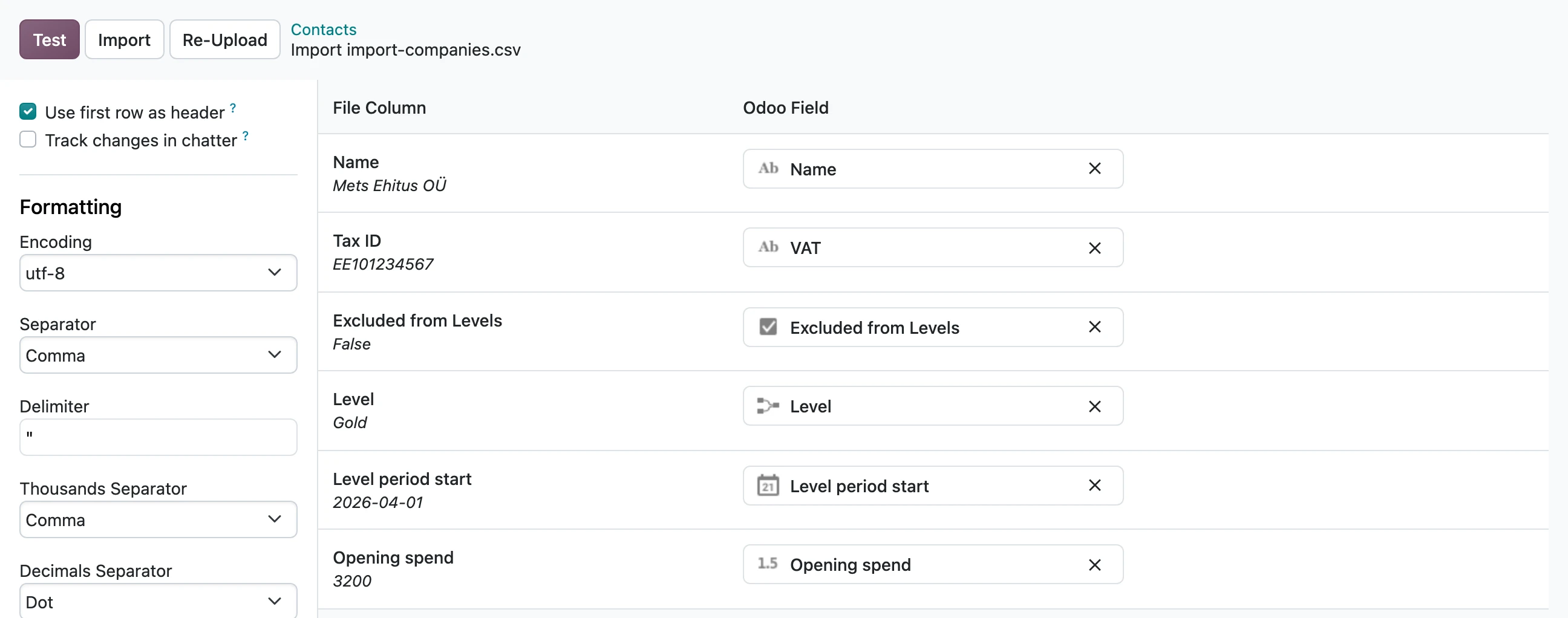
Customers from an earlier system come over with Odoo's own import: Contacts → Import. Import the companies first, then the people, so each person lands under their company. The import needs the Customer levels: Administrator right.
The columns
| Column | What to put in it |
|---|---|
| Company Type | Person or Company (Odoo 18 and 19). On Odoo 20 the Tax ID decides. |
| Related Company | For a person: the company they buy for |
| Excluded from Levels | False for everyone who should be in the levels |
| Level period start | When their current 12-month period began. Within the last 12 months. |
| Opening spend | What they bought in this period before Odoo, taxes included |
| Level | The level they have now, by name, if you know it |
For a company, the level data goes on the company row. A contact person gets no period or opening spend of their own.
What happens after the import
- An imported level holds until the end of its period, and can rise at once.
- The period's spend is the opening spend plus Odoo's sales since the period start. At the end of the period that spend decides the next level, the opening spend goes to 0, and the contact's history says what made the new level.
- A level is given by name. If B2C and B2B both have a "Silver", the customer's own kind is taken.
- Imported customers with an email address get the card by email once the levels are started.
Odoo refuses a period start in the future or more than 12 months ago, a level for someone outside the levels, and a level of the wrong kind.