
One card, a whole year
This is the card you just designed, on Liis's iPhone. Scroll through her year with Kohvik Kuu: everything on the phone comes from Odoo, by itself.
-
Day 1
She joins with a QR code
A QR poster at the checkout, printed from the designer. Liis scans it, types her name and email, confirms the email, and adds the card to Apple Wallet. In Odoo she is now a loyalty member, tagged as joined via QR.
-
Passing by
Her card is ready before she walks in
Liis walks past Kohvik Kuu on her way to work. Her iPhone puts the card on the lock screen with the line you wrote, one swipe away at the checkout.
-
Every purchase
Her points arrive by themselves
The QR code on the card is her Odoo barcode. The cashier scans it at the Odoo POS, the sale gives points in Odoo Loyalty, and a moment later the card on her phone shows them.
-
Week 6
A reward is ready
Her points reach the price of a free coffee. The phone tells her, in her own language, so she comes in to use it.
-
Before points expire
A nudge before points expire
Some of her points expire at the end of the year. The card shows what expires when. She has enough for a reward, so it reminds her fourteen, seven and three days before, once for everything that runs out in those two weeks. That gives her a reason to come back.
-
December
She reaches Gold
With the Customer Levels add-on, her spend this year moves her to Gold. Odoo gives her the Gold pricelist, and her card turns gold, showing what keeps the level.
Cards speak 25 languages, each customer's own from Odoo. At most three alerts per card a day, on iPhone and Android; anything beyond that updates the card quietly. Kohvik Kuu and Liis are examples.
Cards in the wallet get used
What retailers saw after moving their loyalty card into Google Wallet. Published by Google; these are not Tieroo customers.
3×
more often members showed their card at the checkout, and 80% more in-store sign-ups in the first month.
Xenos, 160+ stores in the Netherlands. Google Wallet case study, 202545×
better conversion than the same offer by email; 29% of pass holders redeemed it in a restaurant.
Del Arte, 172 restaurants in France. Google Wallet case study, 202571%
of European consumers say loyalty programmes make them more likely to keep buying from a brand.
Bond & Visa, The Loyalty Report 2023, EuropeThe real designer, inside Odoo
Settings → Tieroo → Design the card. No second login: it opens from Odoo with your programme, rewards, levels and languages already there.
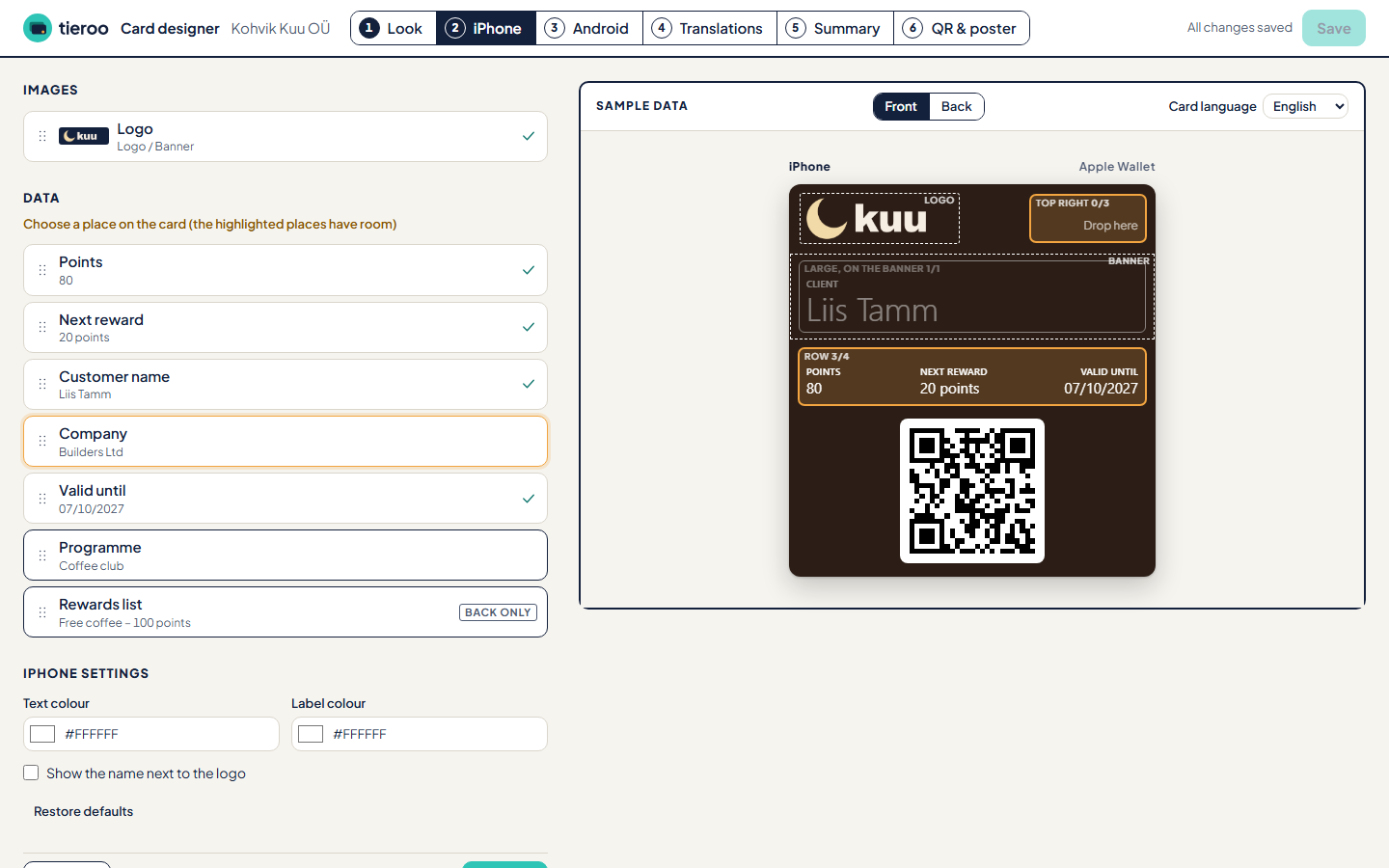
- Only what the phones show. Fields go into the places Apple and Google really have, each with its capacity. What you see is the card.
- iPhone and Android side by side. Both previews show a sample customer from your programme.
- 25 languages. Names, labels and notices per language; each customer gets the card in theirs.
- It checks for you. Text contrast, a logo that would print blurry, a name Google would cut.
- One save updates every card. The new look reaches every phone within minutes.
- Posters to print. A4 and A5 PDFs with bleed and SVG, or order printed posters (A5–A2) and stickers (A4–A2), delivered anywhere in the EU and paid by card when you order.
Customer Levels
Add-on from €49 a month
Spend-based levels, such as Silver and Gold, that give your customers an Odoo pricelist. The card shows the level and what keeps it, so customers know what to aim for.
- B2C: levels per contact.
- B2B: levels per company, so everyone buying for that company gets its pricelist.
- A banner per level: Gold customers see a Gold card.
A separate module in the Odoo Apps store: install it only if you want levels.
From the Apps store to the first card, in Odoo
Self-service from the first click. The free plan, up to 100 cards, is your trial.
Install Tieroo from the Odoo Apps store
Odoo 18, 19 or 20, Community or Enterprise, on Odoo.sh or your own server.
Settings → Tieroo → Start with Tieroo
The plan page opens with your company's details from Odoo already filled in. Monthly, or yearly with two months free.
Pay through Stripe
The free plan takes a card too (nothing is charged) and your VAT number, checked in the EU's VIES.
Back in Odoo, connected
Odoo collects its key by itself. Nothing to copy, nothing to paste.
Design the card and send it
Email it to your loyalty members from Odoo, or put up the QR poster in the shop.
Nothing to connect
- No Apple or Google developer account
- No certificates, no keys to copy
- No server and no app to build
- No Website app needed in Odoo
Cards are issued under Tieroo's Apple and Google accounts. That is why every account belongs to a real company with a VAT number.
- Two modules. Tieroo for the cards, with joining by QR built in. Add Customer Levels when you want levels.
- Change any time. Plan and add-on on the plan page; card and invoices in Stripe's portal.
- Over the limit? 14 days to choose a bigger plan, one email to tell you. Cards already out keep updating.
Pay for the cards in use
A card counts when it is on at least one phone. Start free with up to 100 cards and move up when your customers do.
More than 100,000 cards? Contact us for a price.
A card counts when it is on at least one phone, once however many devices. Cards never added to a wallet do not count. Over the limit, you have 14 days to move up; cards already out keep updating.
Questions
Something else? Write to support@tieroo.com.
Which Odoo versions are supported?
Odoo 18, 19 and 20, Community or Enterprise, on Odoo.sh or your own server. Odoo Online cannot install custom modules, so Tieroo does not work there.
What notifications do my customers get?
On the lock screen: when their points change (at most once in 20 hours), when a reward becomes available, when their level changes, and 14, 7 and 3 days before the card or their points expire. A points reminder comes only when they have enough for a reward, and covers everything that expires within two weeks. If you switch it on, the card also comes up near your shops.
A card alerts at most three times a day, on iPhone and Android alike; anything beyond that updates the card without a sound. Notices come in each customer's own language. On iPhone you can write your own text for a field's change and for the lock screen near your shops.
Emails come from your own Odoo: the card itself, and the confirmation when someone joins by QR. For a welcome series or a newsletter, use Odoo's Marketing Automation with the "joined via QR" tag.
Do you see where my customers are?
No. When you switch on "Show the card near our shops" in Odoo, each card carries the location of up to 10 of your shops. The phone compares its own position with them and brings the card up when a customer is close. Apple and Google send us no position, so neither we nor you learn where a customer is. The feature is off until you switch it on.
Why do you need a card and a VAT number for the free plan?
Every card is issued under our Apple and Google accounts. One misused account could put everyone's cards at risk, so every account belongs to a real, identifiable company. Stripe checks the card with a zero-euro authorisation: nothing is charged on the free plan.
Do my customers need an app?
No. The card goes into Apple Wallet on iPhone or Google Wallet on Android, next to their other cards. We run Apple Wallet and Google Wallet for you: no developer accounts or certificates of your own.
What counts as a card?
A card in use: one that is on at least one phone. It counts once, however many devices it is on. Cards that were sent but never added to a wallet do not count.
What happens if I go over my plan's limit?
We email you, Odoo shows it, and you have 14 days to choose a bigger plan. Nothing changes automatically. After 14 days new cards wait until you move up; the cards your customers already have keep updating.
How do I change plan or cancel?
Settings → Tieroo → Plan and billing. A bigger plan starts at once and you pay the difference; a smaller one, or monthly instead of yearly, starts with your next period. Card, invoices and cancelling are in Stripe's customer portal, one click from there.
When a subscription ends you drop to the free plan: up to 100 cards keep updating, cards above that stay on the phones showing their last state. If you close your account, a paid plan runs to the end of the paid period first; after it closes you can open it again from Odoo for 90 days; then we delete the data.
Where is the data, and who is responsible for it?
You are the controller of your customers' data; Tieroo processes it for you. Everything is hosted in the EU, at Hetzner in Germany, with daily encrypted backups.
The platform holds only what the card needs: the customer's name, the points or level shown on the card, card identifiers and the phones' push tokens. No purchase history and no location. Read the privacy policy.